AC-34
AIR CONDITIONING SYSTEM — Cooling Unit
Cooling Unit
[Diagram showing cooling unit location]
AC0080
6. REMOVE GROMMETS FROM INLET AND OUTLET FITTINGS
7. REMOVE GLOVE BOX AND UNDER COVER
8. REMOVE GLOVE BOX COVER AND REINFORCEMENT
9. REMOVE EFI AND A.B.S. COMPUTER
10. DISCONNECT CONNECTOR
11. REMOVE COOLING UNIT
Remove four screws and three nuts.
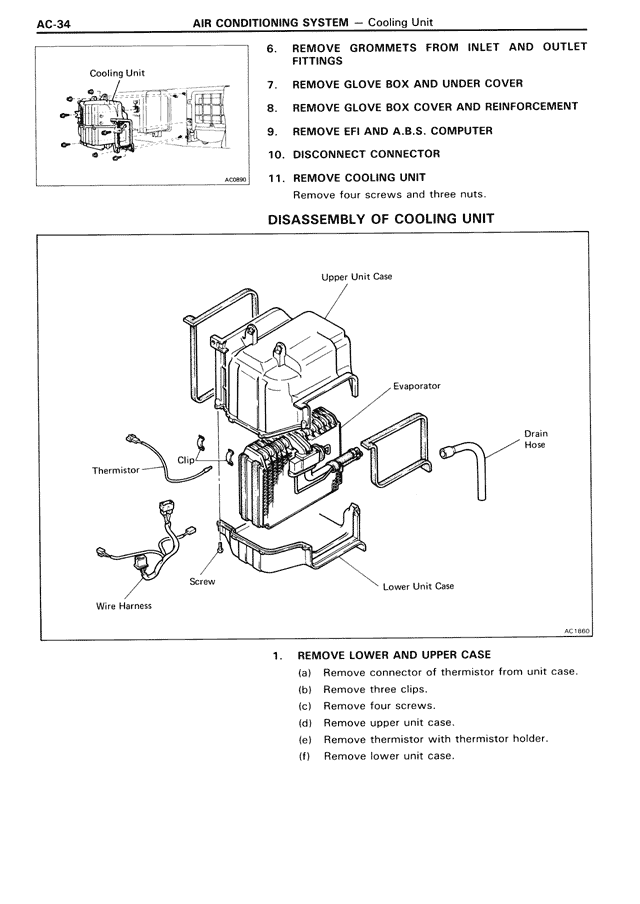
DISASSEMBLY OF COOLING UNIT
[Diagram showing exploded view of cooling unit with labeled components:
Upper Unit Case
Evaporator
Drain Hose
Clip
Thermistor
Screw
Wire Harness
Lower Unit Case]
AC1860
1. REMOVE LOWER AND UPPER CASE
(a) Remove connector of thermistor from unit case.
(b) Remove three clips.
(c) Remove four screws.
(d) Remove upper unit case.
(e) Remove thermistor with thermistor holder.
(f) Remove lower unit case.