100%
Page text (OCR transcript)
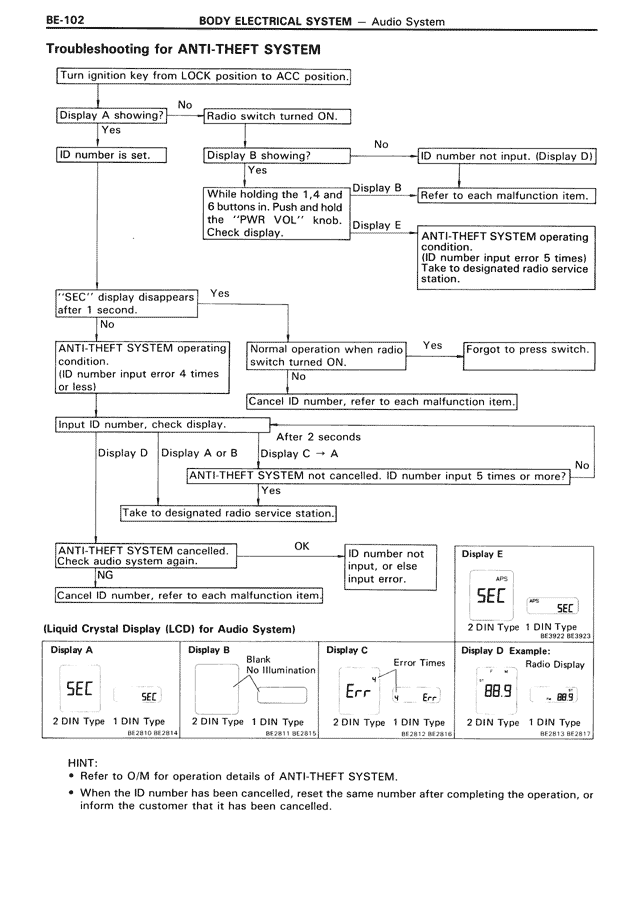
Troubleshooting for ANTI-THEFT SYSTEM

Turn ignition key from LOCK position to ACC position.

Display A showing? → No → Radio switch turned ON.
↓ Yes
ID number is set. → Display B showing? → No → ID number not input. (Display D)
                      ↓ Yes
While "A" is displayed hold and push 6 buttons in. Push and hold the "PWR VOL" knob. Check display. → Display B → Refer to each malfunction item.
                                                                                    → Display E → ANTI-THEFT SYSTEM operating condition. (ID number input error 5 times) Take to designated radio service station.

"SEC" display disappears after 1 second. → Yes →
↓ No
ANTI-THEFT SYSTEM operating condition. (ID number input error 4 times or less) → Normal operation when radio switch turned ON. → Yes → Forgot to press switch.
                                                                                   ↓ No
Input ID number, check display. ← Cancel ID number, refer to each malfunction item.

After 2 seconds
Display D   Display A or B   Display C → A

ANTI-THEFT SYSTEM not cancelled. ID number input 5 times or more? → No
↓ Yes
Take to designated radio service station.

ANTI-THEFT SYSTEM cancelled. Check audio system again. → OK → ID number not input, or else input error.
↓ NG
Cancel ID number, refer to each malfunction item.

Display E
SEC
2 DIN Type  1 DIN Type
           BE-2012 BE-2813

(Liquid Crystal Display (LCD) for Audio System)

Display A                Display B                Display C                Display D Example:
SEC                      Blank                    Err                      89.9        Radio Display
SEC                      No illumination          Error Times   Err
2 DIN Type  1 DIN Type   2 DIN Type  1 DIN Type   2 DIN Type  1 DIN Type   2 DIN Type  1 DIN Type
BE-2810 BE-2814          BE-2811 BE-2815          BE-2812 BE-2816          BE-2813 BE-2817

HINT:
• Refer to O/M for operation details of ANTI-THEFT SYSTEM.
• When the ID number has been cancelled, reset the same number after completing the operation, or inform the customer that it has been cancelled.