Page text (OCR transcript)
ALTERNATOR
COMPONENTS

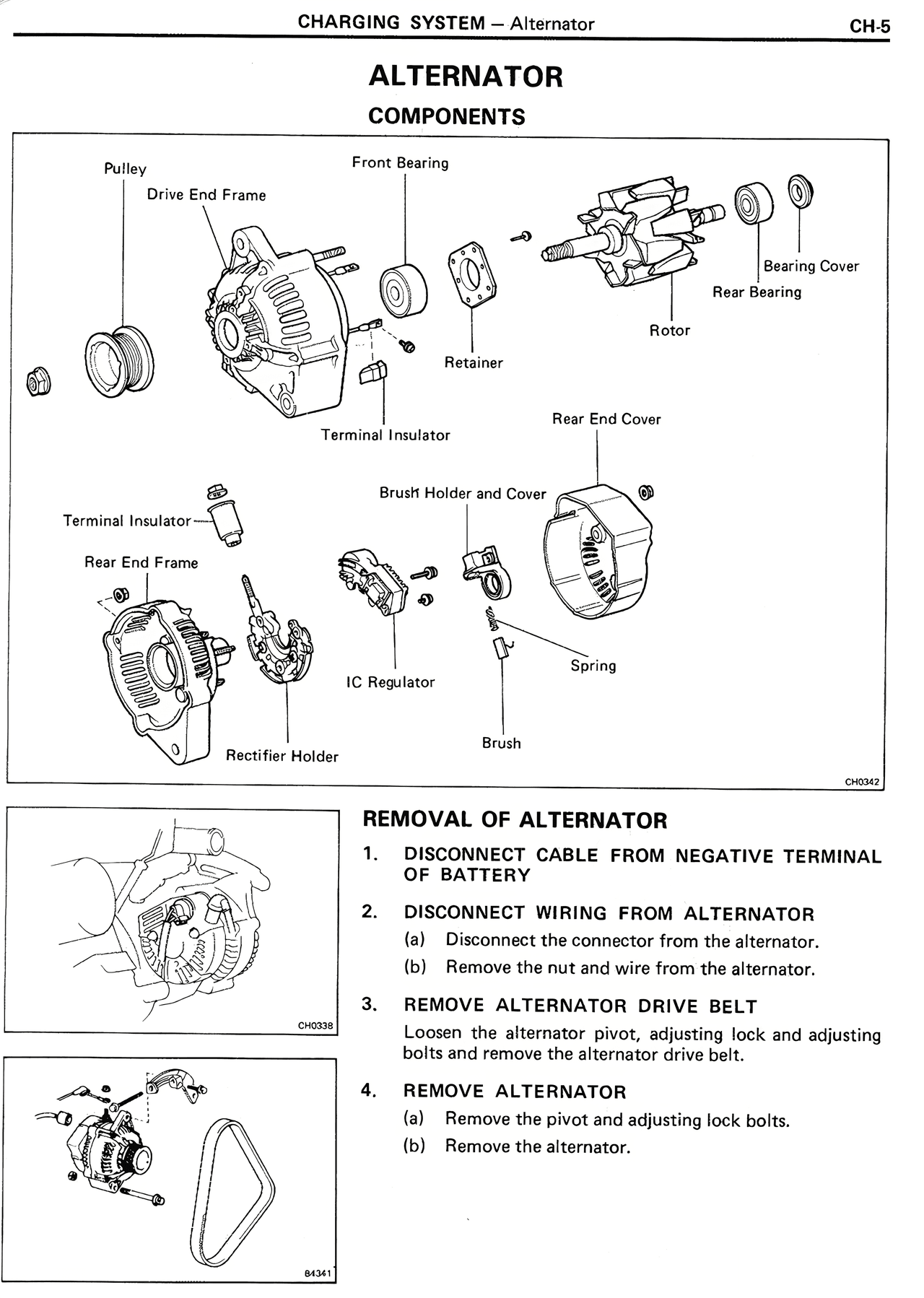
Pulley
Drive End Frame
Front Bearing
Bearing Cover
Rear Bearing
Rotor
Retainer
Terminal Insulator
Rear End Cover
Terminal Insulator
Brush Holder and Cover
Rear End Frame
IC Regulator
Spring
Rectifier Holder
Brush

REMOVAL OF ALTERNATOR

1. DISCONNECT CABLE FROM NEGATIVE TERMINAL OF BATTERY

2. DISCONNECT WIRING FROM ALTERNATOR
(a) Disconnect the connector from the alternator.
(b) Remove the nut and wire from the alternator.

3. REMOVE ALTERNATOR DRIVE BELT
Loosen the alternator pivot, adjusting lock and adjusting bolts and remove the alternator drive belt.

4. REMOVE ALTERNATOR
(a) Remove the pivot and adjusting lock bolts.
(b) Remove the alternator.