Page text (OCR transcript)
Reference:
10
3
1
0.2
BE2830

How to Replace Terminal
(with Terminal Retainer Type)
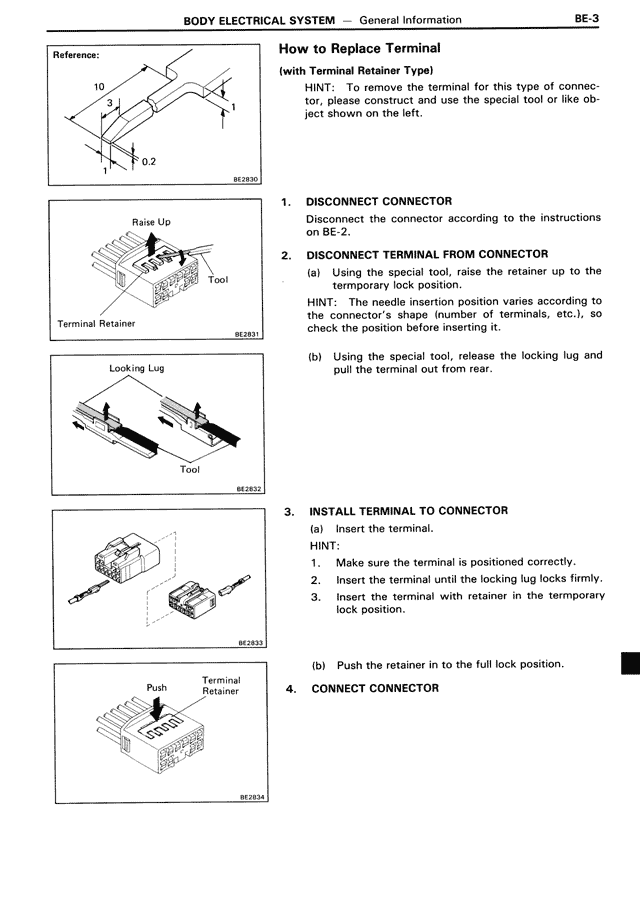
HINT: To remove the terminal for this type of connector, please construct and use the special tool or like object shown on the left.

1. DISCONNECT CONNECTOR
Disconnect the connector according to the instructions on BE-2.

2. DISCONNECT TERMINAL FROM CONNECTOR
(a) Using the special tool, raise the retainer up to the termporary lock position.
HINT: The needle insertion position varies according to the connector's shape (number of terminals, etc.), so check the position before inserting it.
(b) Using the special tool, release the locking lug and pull the terminal out from rear.

Raise Up
Tool
Terminal Retainer
BE2831

Locking Lug
Tool
BE2832

3. INSTALL TERMINAL TO CONNECTOR
(a) Insert the terminal.
HINT:
1. Make sure the terminal is positioned correctly.
2. Insert the terminal until the locking lug locks firmly.
3. Insert the terminal with retainer in the termporary lock position.
BE2833

Push
Terminal Retainer
BE2834

(b) Push the retainer in to the full lock position.

4. CONNECT CONNECTOR