← p.017p.019 →
WH/Wire Harness — Step 2. Disconnect the Terminal from the Connector., page 18
18 / 414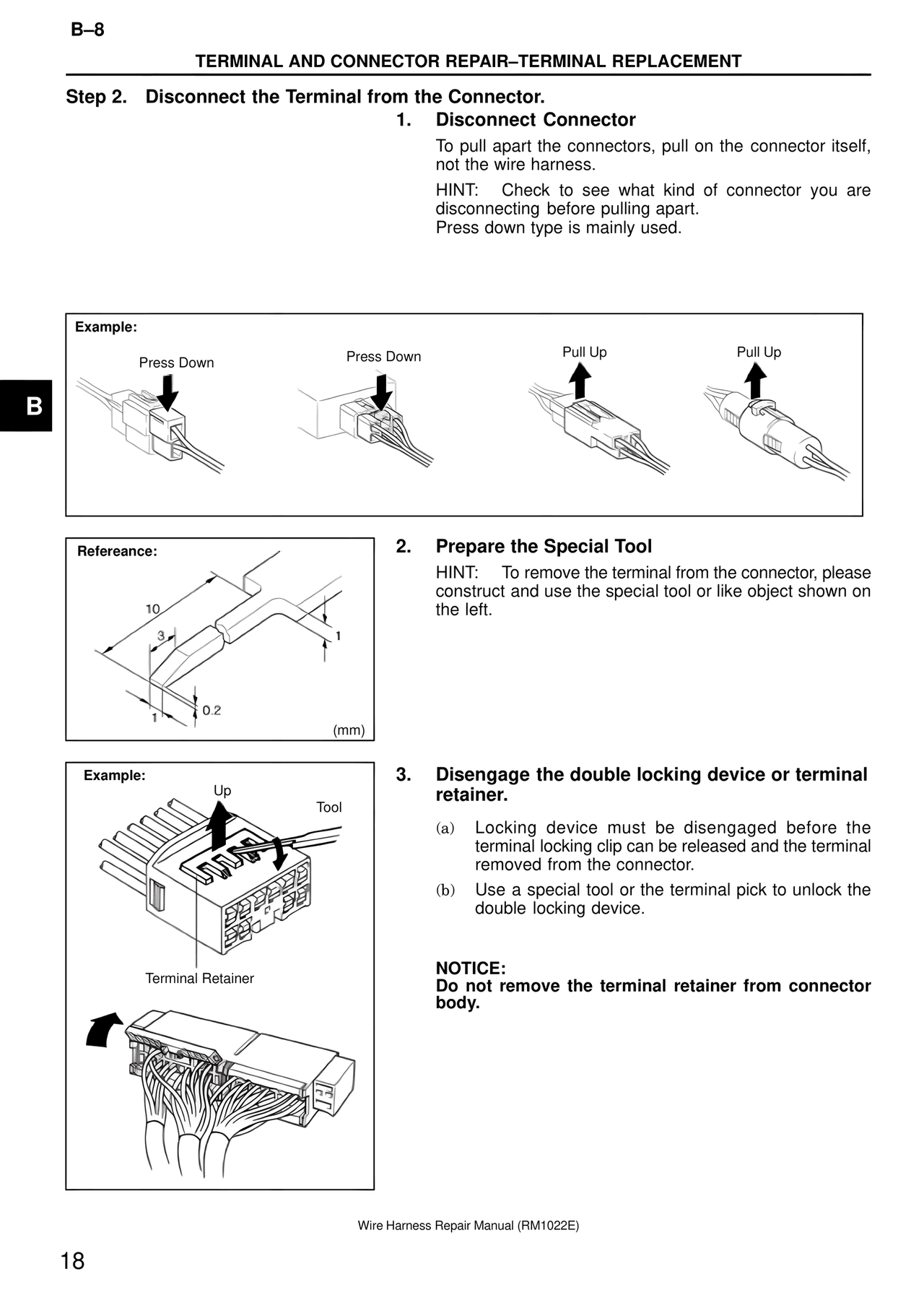
100%
Page text (OCR transcript)
B–8

TERMINAL AND CONNECTOR REPAIR–TERMINAL REPLACEMENT

Step 2. Disconnect the Terminal from the Connector.

1. Disconnect Connector

To pull apart the connectors, pull on the connector itself, not the wire harness.
HINT: Check to see what kind of connector you are disconnecting before pulling apart.
Press down type is mainly used.

Example:
Press Down
Press Down
Pull Up
Pull Up

B

Refereance:
10
3
1
1
0.2
(mm)

2. Prepare the Special Tool

HINT: To remove the terminal from the connector, please construct and use the special tool or like object shown on the left.

Example:
Up
Tool
Terminal Retainer

3. Disengage the double locking device or terminal retainer.

(a) Locking device must be disengaged before the terminal locking clip can be released and the terminal removed from the connector.
(b) Use a special tool or the terminal pick to unlock the double locking device.

NOTICE:
Do not remove the terminal retainer from connector body.

Wire Harness Repair Manual (RM1022E)

18