Page text (OCR transcript)
B–23

TERMINAL AND CONNECTOR REPAIR–TERMINAL REPLACEMENT

Rear Holder

Locking Clip

Pull Out

Connector

Wire Harness

"Waterproof Type"

Terminal
Retainer

Special
Tool

Locking
Clip

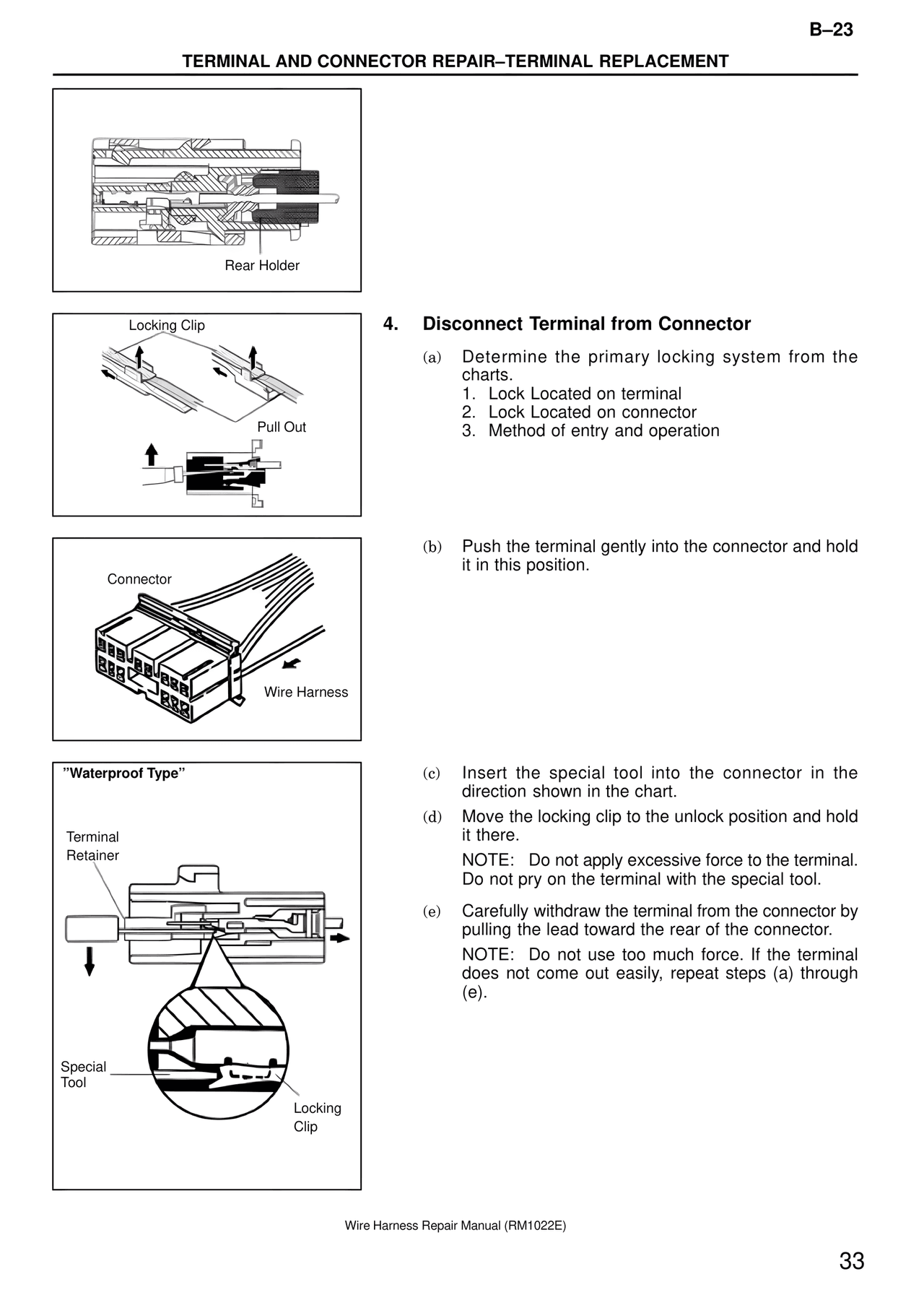
4. Disconnect Terminal from Connector

(a) Determine the primary locking system from the
charts.
1. Lock Located on terminal
2. Lock Located on connector
3. Method of entry and operation

(b) Push the terminal gently into the connector and hold
it in this position.

(c) Insert the special tool into the connector in the
direction shown in the chart.
(d) Move the locking clip to the unlock position and hold
it there.
NOTE: Do not apply excessive force to the terminal.
Do not pry on the terminal with the special tool.

(e) Carefully withdraw the terminal from the connector by
pulling the lead toward the rear of the connector.
NOTE: Do not use too much force. If the terminal
does not come out easily, repeat steps (a) through
(e).

Wire Harness Repair Manual (RM1022E)

33