BR–126
BRAKE SYSTEM – TRACTION CONTROL SYSTEM (TRAC)
TRAC
R06985
DIAGNOSIS SYSTEM INDICATOR CHECK
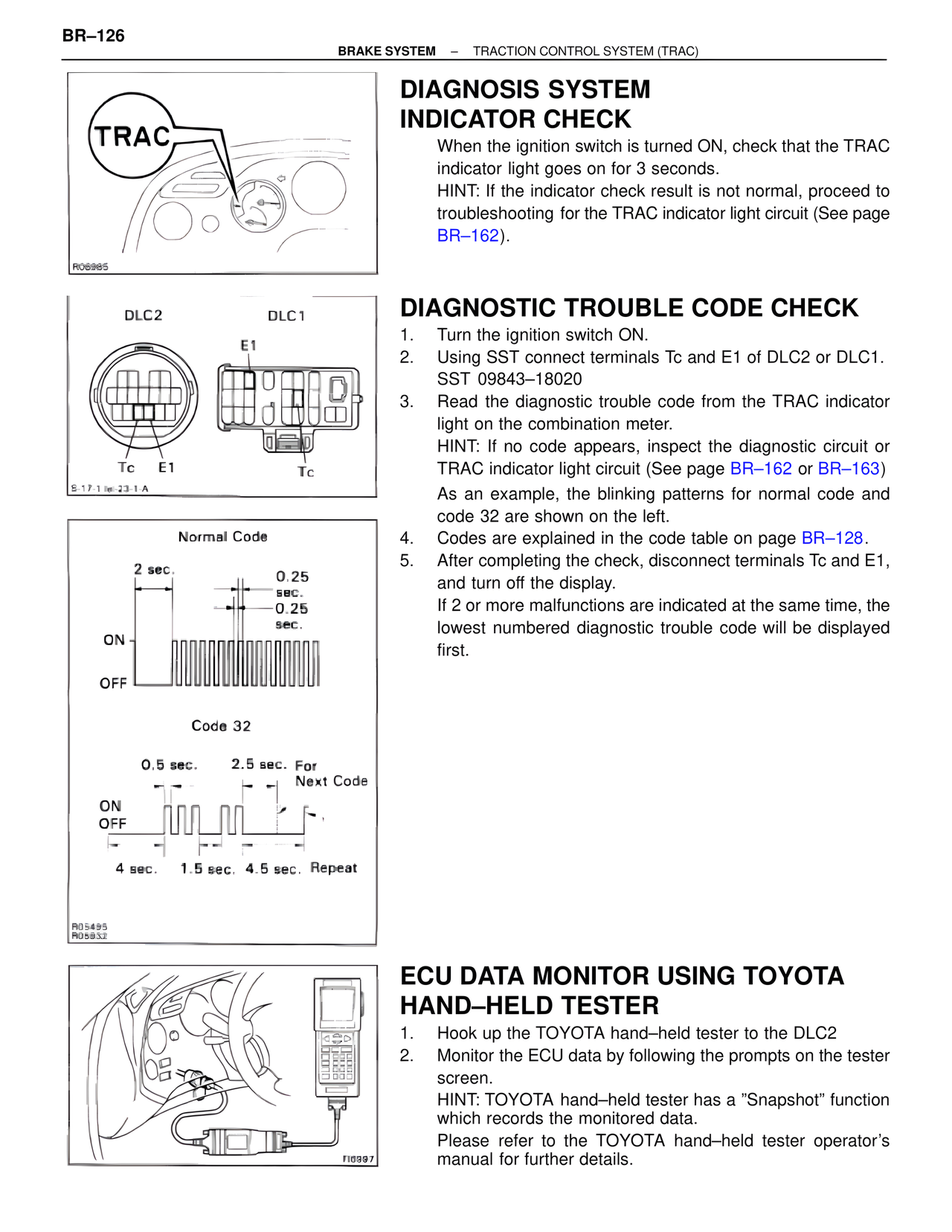
When the ignition switch is turned ON, check that the TRAC indicator light goes on for 3 seconds.
HINT: If the indicator check result is not normal, proceed to troubleshooting for the TRAC indicator light circuit (See page BR–162).
DLC2 DLC1
E1
Tc E1 Tc
S-17-1 lei-23-1-A
DIAGNOSTIC TROUBLE CODE CHECK
1. Turn the ignition switch ON.
2. Using SST connect terminals Tc and E1 of DLC2 or DLC1.
SST 09843–18020
3. Read the diagnostic trouble code from the TRAC indicator light on the combination meter.
HINT: If no code appears, inspect the diagnostic circuit or TRAC indicator light circuit (See page BR–162 or BR–163)
As an example, the blinking patterns for normal code and code 32 are shown on the left.
4. Codes are explained in the code table on page BR–128.
5. After completing the check, disconnect terminals Tc and E1, and turn off the display.
If 2 or more malfunctions are indicated at the same time, the lowest numbered diagnostic trouble code will be displayed first.
Normal Code
2 sec.
0.25
sec.
0.25
sec.
ON
OFF
Code 32
0.5 sec. 2.5 sec. For
Next Code
ON
OFF
4 sec. 1.5 sec. 4.5 sec. Repeat
R05495
R05852
FIG897
ECU DATA MONITOR USING TOYOTA HAND–HELD TESTER
1. Hook up the TOYOTA hand–held tester to the DLC2
2. Monitor the ECU data by following the prompts on the tester screen.
HINT: TOYOTA hand–held tester has a "Snapshot" function which records the monitored data.
Please refer to the TOYOTA hand–held tester operator's manual for further details.