IN–23
INTRODUCTION – HOW TO TROUBLESHOOT ECU CONTROLLED SYSTEMS
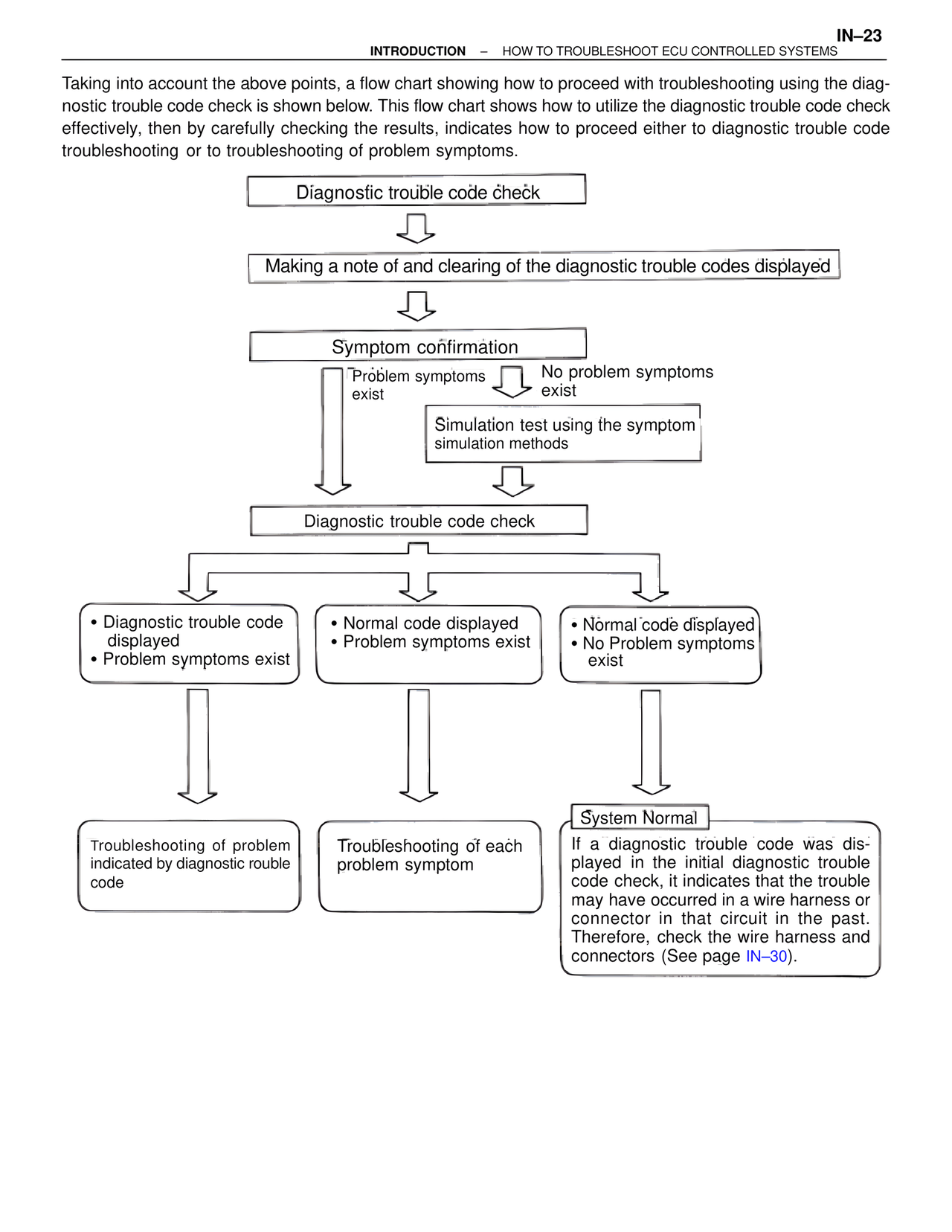
Taking into account the above points, a flow chart showing how to proceed with troubleshooting using the diagnostic trouble code check is shown below. This flow chart shows how to utilize the diagnostic trouble code check effectively, then by carefully checking the results, indicates how to proceed either to diagnostic trouble code troubleshooting or to troubleshooting of problem symptoms.
Diagnostic trouble code check
Making a note of and clearing of the diagnostic trouble codes displayed
Symptom confirmation
Problem symptoms exist
No problem symptoms exist
Simulation test using the symptom simulation methods
Diagnostic trouble code check
• Diagnostic trouble code displayed
• Problem symptoms exist
• Normal code displayed
• Problem symptoms exist
• Normal code displayed
• No Problem symptoms exist
Troubleshooting of problem indicated by diagnostic rouble code
Troubleshooting of each problem symptom
System Normal
If a diagnostic trouble code was displayed in the initial diagnostic trouble code check, it indicates that the trouble may have occurred in a wire harness or connector in that circuit in the past. Therefore, check the wire harness and connectors (See page IN–30).