SA–82
SUSPENSION AND AXLE – REAR DIFFERENTIAL
SST
R07229
RH Side
LH Side
R00089
LH RH
SST
R00088
R07229
209009
DIFFERENTIAL MOUNTING CUSHION REPLACEMENT
1. DIFFERENTIAL ASSEMBLY REMOVAL
(See page SA–60)
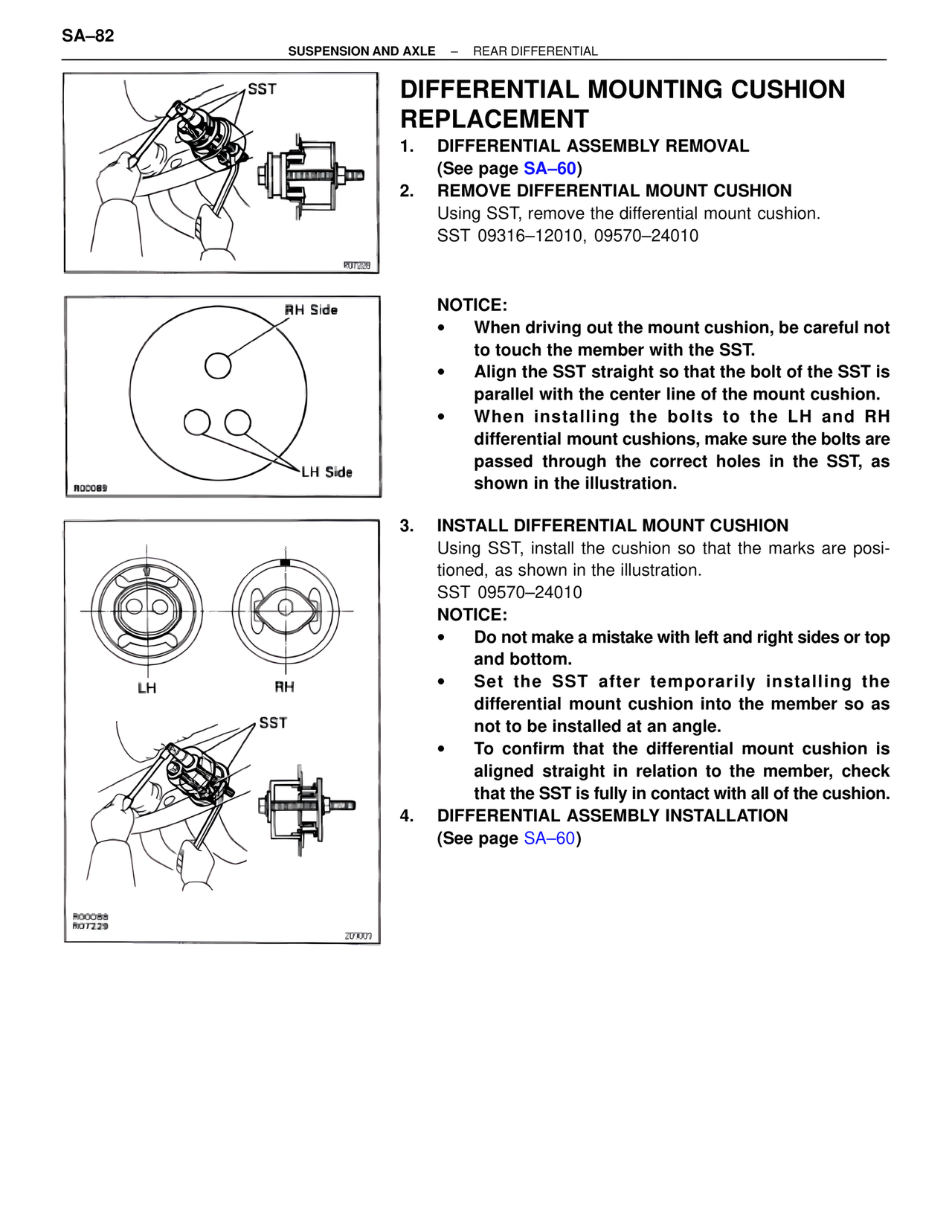
2. REMOVE DIFFERENTIAL MOUNT CUSHION
Using SST, remove the differential mount cushion.
SST 09316–12010, 09570–24010
NOTICE:
• When driving out the mount cushion, be careful not to touch the member with the SST.
• Align the SST straight so that the bolt of the SST is parallel with the center line of the mount cushion.
• When installing the bolts to the LH and RH differential mount cushions, make sure the bolts are passed through the correct holes in the SST, as shown in the illustration.
3. INSTALL DIFFERENTIAL MOUNT CUSHION
Using SST, install the cushion so that the marks are positioned, as shown in the illustration.
SST 09570–24010
NOTICE:
• Do not make a mistake with left and right sides or top and bottom.
• Set the SST after temporarily installing the differential mount cushion into the member so as not to be installed at an angle.
• To confirm that the differential mount cushion is aligned straight in relation to the member, check that the SST is fully in contact with all of the cushion.
4. DIFFERENTIAL ASSEMBLY INSTALLATION
(See page SA–60)