B–18
TERMINAL AND CONNECTOR REPAIR–TERMINAL REPLACEMENT
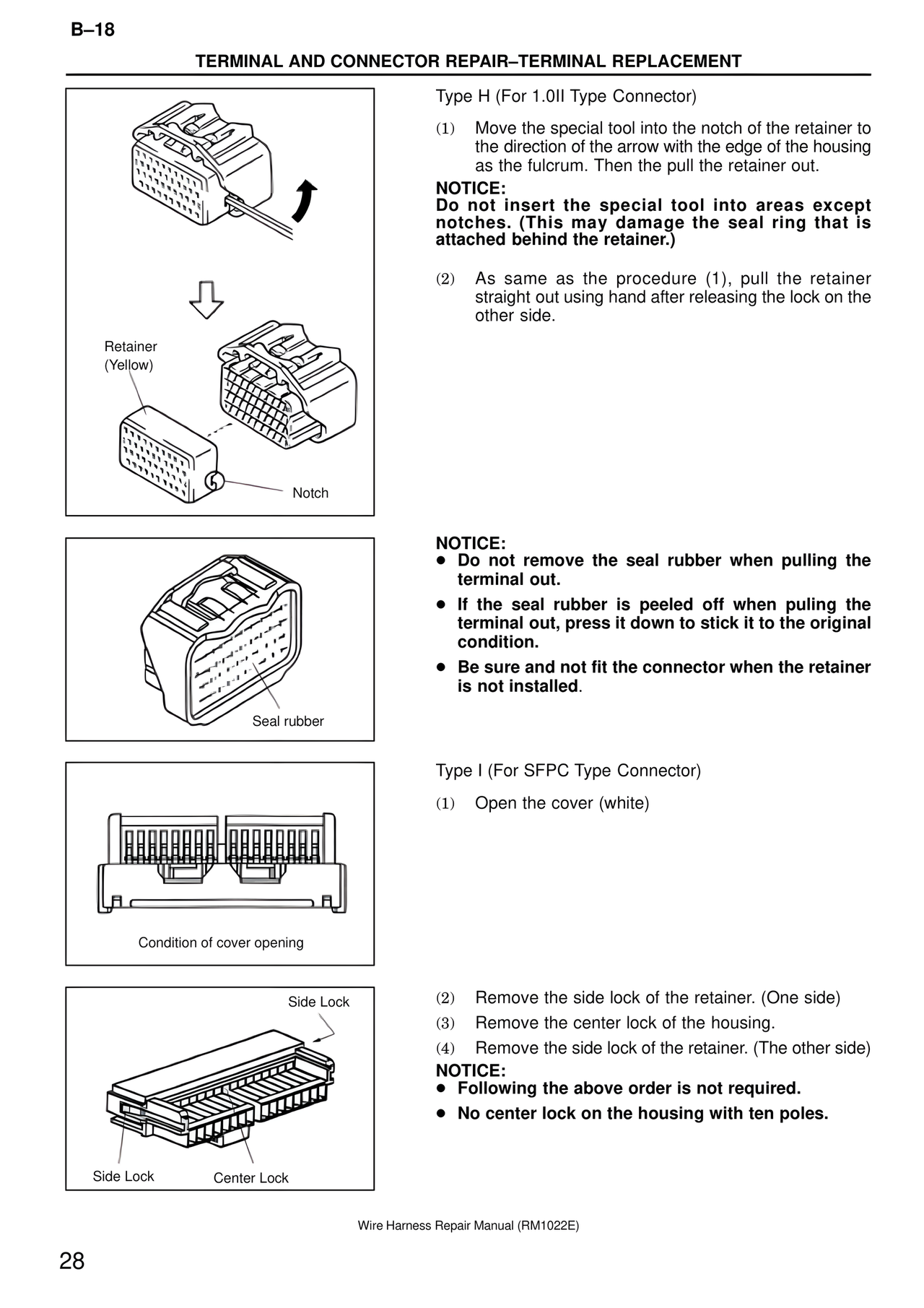
Type H (For 1.0II Type Connector)
(1) Move the special tool into the notch of the retainer to
the direction of the arrow with the edge of the housing
as the fulcrum. Then the pull the retainer out.
NOTICE:
Do not insert the special tool into areas except
notches. (This may damage the seal ring that is
attached behind the retainer.)
(2) As same as the procedure (1), pull the retainer
straight out using hand after releasing the lock on the
other side.
Retainer
(Yellow)
Notch
NOTICE:
● Do not remove the seal rubber when pulling the
terminal out.
● If the seal rubber is peeled off when puling the
terminal out, press it down to stick it to the original
condition.
● Be sure and not fit the connector when the retainer
is not installed.
Seal rubber
Type I (For SFPC Type Connector)
(1) Open the cover (white)
Condition of cover opening
Side Lock
(2) Remove the side lock of the retainer. (One side)
(3) Remove the center lock of the housing.
(4) Remove the side lock of the retainer. (The other side)
NOTICE:
● Following the above order is not required.
● No center lock on the housing with ten poles.
Side Lock Center Lock
Wire Harness Repair Manual (RM1022E)
28